AI Art Prompt & POD Guide
Last updated: October 31, 2026
Explore Hangul-inspired examples, read their meanings and design stories, and download a free AI prompt TXT to create your own artwork. HangulNamu provides prompts and creative inspiration, rather than finished print-ready PNG files.
Choose your own AI image-generation tool. Prompts aim to inspire original new artwork with a similar mood; they do not promise an exact copy of the example. Read our AI Prompt Usage & Rights Policy before using a result.
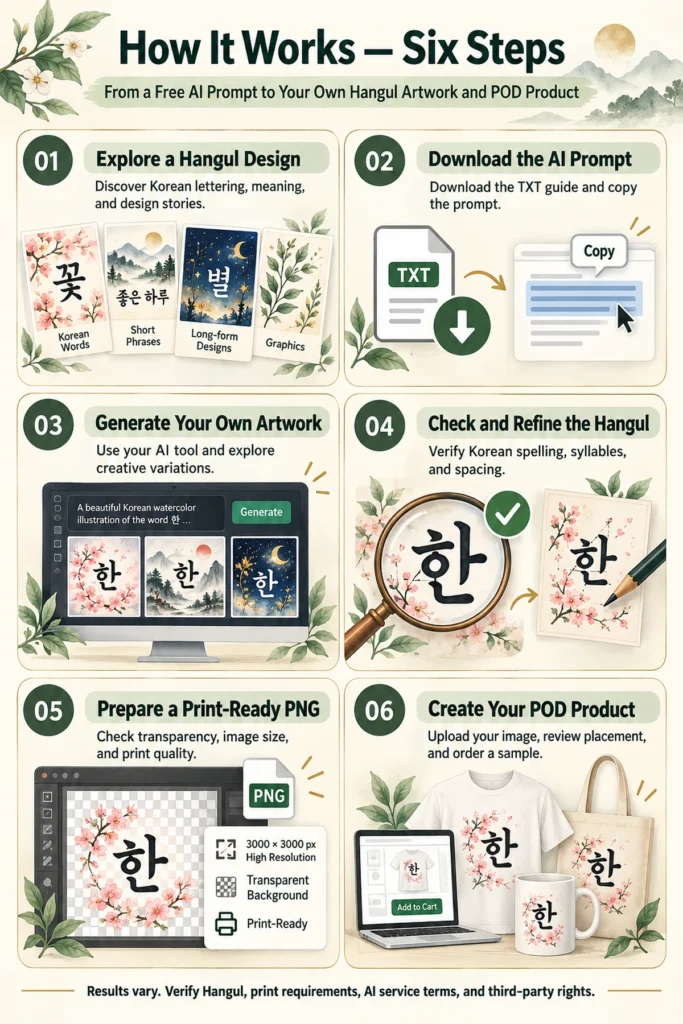
How It Works — Six Steps
1. Explore a Hangul Design
Browse Korean Words, Short Phrases, Long-form Designs, or Graphics. Read the Korean text, its meaning, and the design story to understand the intended lettering and artistic direction.
2. Download the AI Prompt
Use Download AI Prompt (.txt) on an available prompt page. Open the TXT file and copy the prompt into your chosen AI image tool. A TXT prompt is an instruction for image generation, not an image file.
3. Generate Your Own Artwork
Paste the prompt into the tool and adjust it to your own idea. Follow that service’s terms and instructions. Models, versions, settings, and random seeds can produce different images, including results similar to other users’ work. Generate and compare variations as needed.
4. Check and Refine the Hangul
Compare the generated text with the exact Korean shown on the page. Check consonants, vowels, syllable blocks, spelling, spacing, punctuation, and line breaks. AI tools may add, omit, or distort letters. Correct errors with an image editor or add verified Korean lettering yourself; seek help from a Korean reader when needed.
5. Prepare a Print-Ready PNG
Export your own final artwork as a PNG suitable for the chosen product. Remove the background and create transparency if required, while preserving clean edges. Check the printer’s required pixel dimensions, effective print resolution, file-size limits, color profile, bleed, and safe area. Enlarging a small image or changing its DPI label alone does not add detail. Review the image at the intended print size.
6. Create Your POD Product
Select an independent POD provider, upload your prepared file, and adjust size and placement within its print area. Review its preview and production requirements before ordering. Check that your intended use complies with your AI service’s terms, the POD provider’s terms, applicable law, and third-party rights. Order a sample when color or fine detail matters.
Visual Guide
Creative Applications & Actual Products
The preview artwork and product mockups illustrate creative possibilities. They are not downloadable print-ready deliverables or guaranteed examples of your generated output.
Your generated artwork and actual products may differ from the examples in color, proportions, print size, placement, texture, and fine detail. Results depend on the AI tool, editing, print method, material, and POD provider. Review a product preview and sample before a larger order.
Rights, Services & Support
You are responsible for checking rights and commercial-use conditions for your generated image. HangulNamu does not guarantee copyright ownership, exclusivity, originality, non-infringement, or permission for a particular commercial use, and does not sell or issue a separate commercial license.
AI image services and POD providers operate independently under their own terms, prices, privacy policies, and technical requirements. HangulNamu does not generate images on visitors’ behalf or manufacture, fulfill, or ship products.
Buy Me a Coffee and Ko-fi support is voluntary creative support, not a purchase of usage rights. Questions about our prompts: contact@hangulnamu.com.